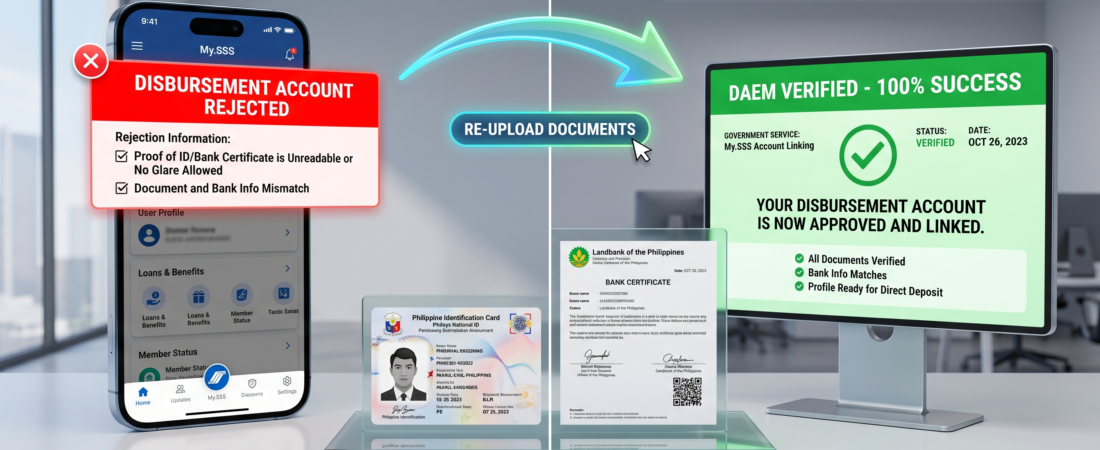
To bypass SSS Disbursement Account Enrollment Module (DAEM) verification blocks, you must ensure your uploaded Proof of Account (POA) and primary valid government ID are uncropped, color-scanned, and under 1MB in size. Any discrepancy between your registered SSS profile name and your exact bank account name will trigger an automatic rejection within 24 to 48 hours.
Why Is Your DAEM Account Being Rejected? Core Problem Breakdown
Most members encounter frustrating validation loops when trying to enroll digital banking apps or traditional checking accounts. These system rejections are triggered by strict algorithmic trust parameters enforced in 2026:
- Name Mismatch Anomalies: If your middle name is completely spelled out on your SSS profile but initialized as a single letter on your bank account statement, the system automated compliance check rejects it instantly.
- Low-Quality Document Uploads: Grayscale photos, blurry smartphone images, and documents with cut-off borders fail the automated OCR validation checks. SSS requires full-color, clear images.
- Incorrect Document Types: Uploading standard debit card photos without an embossed name or submitting simple online account screenshots without account numbers will lead to immediate rejection.
SSS DAEM Acceptance Matrix
| Proof of Account (POA) Type | Required Critical Elements | Acceptable Formats |
| Digital Bank Certificate | Full name, exact account number, and official bank logo/stamp. | PDF or JPEG (<1MB) |
| Traditional Bank Statement | Clear transaction statement showing the account owner’s name and details. | High-quality color scan |
| Physical Debit Card | Account owner’s name must be clearly embossed on the front of the card. | Flat, glare-free photo |
Step-by-Step Resolution Workflow to Bypass Blocks
Follow these precise steps to clear an active registration error and complete your enrollment successfully:
- Format Your Proof of Account (POA): Request an official digital bank certificate from your provider. Verify that your first name, middle name, and last name match your official SSS record exactly.
- Capture the Perfect Verification Selfie: Hold your primary government ID (like your PhilSys National ID or Passport) flat and steady next to your chest. Avoid tilting the card to prevent any camera flash glare.
- Compress and Rename Files: Ensure all image files are saved as JPEGs or PDFs under 1MB. Use a clean naming format like
LastName_FirstResource_POA.jpgto help processing clerks verify files easily. - Clear the Previous Entry and Re-upload: Log back into your My.SSS account, remove the rejected bank data profile from the module grid, click Add Account, choose your correct bank, and upload your newly formatted files.
Pro Tips & Warnings
⚠️ CRITICAL WARNING: Do not try to use third-party virtual e-wallets that are not registered under your legal name. The system’s automated background checks cross-reference data against the bank’s database. Any mismatches can lead to temporary account freezes or flags on your profile.
FAQs: Overcoming DAEM Errors
1. How long does the SSS take to evaluate a re-submitted DAEM profile?
The processing and validation period takes between 24 to 48 business hours from your submission timestamp. You will receive an automated email confirmation detailing the review outcome.
2. Can I apply for an SSS loan while my DAEM enrollment is pending?
No. The system blocks you from accessing the salary or calamity loan window until you have an active, verified account in the portal.
3. Which government identity cards are preferred for fast tracking?
The primary options for automated verification include the PhilSys National ID, UMID Card, and valid Passports.
4. What should I do if my profile name differs slightly from my actual ID?
If there is an error in your SSS database records, you must submit a Member Data Change Request Form (E-4) at a branch to update your records before using the online module.
5. Why do I keep getting a ‘File Size Exceeded’ message?
The DAEM portal restricts all individual document attachment uploads to a maximum limit of 1MB. Use an online image compressor to shrink your files before uploading.
👉 Want to verify your contribution history? Log in securely to the Official My.SSS Portal to view your records and track active benefits.
👉 Need to check loan eligibility? Review our detailed Guide on SSS Salary Loan Requirements to confirm your total posted monthly contributions.